MiniMax H3 Image Draws Native 4K Through an API From $0.0822, 4.2x Less Than Nano Banana Pro 4K
16.8 million pixels in 9.1 seconds. MiniMax’s new open-weight image model drew a native 4096×4096 picture faster on its Highspeed mode than its Standard mode drew a 2048×2048 one (9.7 seconds) in our test. Through MegaBrain’s API a 4K picture costs $0.0822 on Standard; Nano Banana Pro at 4K costs $0.345.
What MiniMax shipped
MiniMax announced H3 Image on November 11, 2026. It is the image side of H3, MiniMax’s video model: the same family, turned to stills, with the weights on Hugging Face.
- Native 4K. A square comes out at 4096×4096. Any size from 655,360 to 20,000,000 pixels works, from 1:3 to 3:1.
- 2 modes. Standard and Highspeed are the same model; Highspeed is faster and its image tokens cost twice as much.
- Long prompts. Up to 32,000 characters at MiniMax; through MegaBrain, up to 20,000, the most our content check reads. By default the model rewrites a short prompt into a long, detailed one before it draws.
- Edits from up to 16 images. The prompt calls them Image 1, Image 2 and so on, in the order you send them.
- Open weights. A 33.1B-parameter transformer that samples in 6 steps, without classifier-free guidance.
Not supported yet: masks for inpainting and transparent backgrounds.
The result
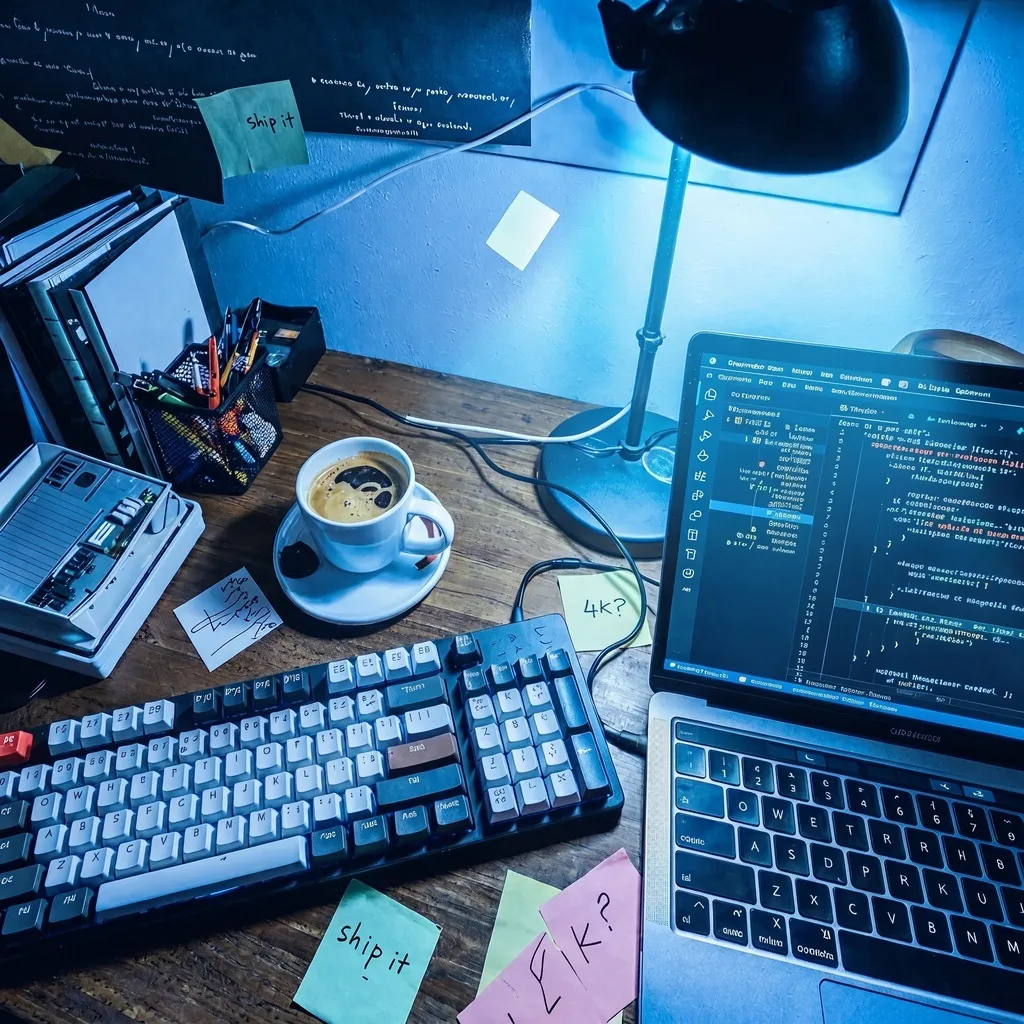
One prompt, both modes, 4096×4096, shown here scaled down:
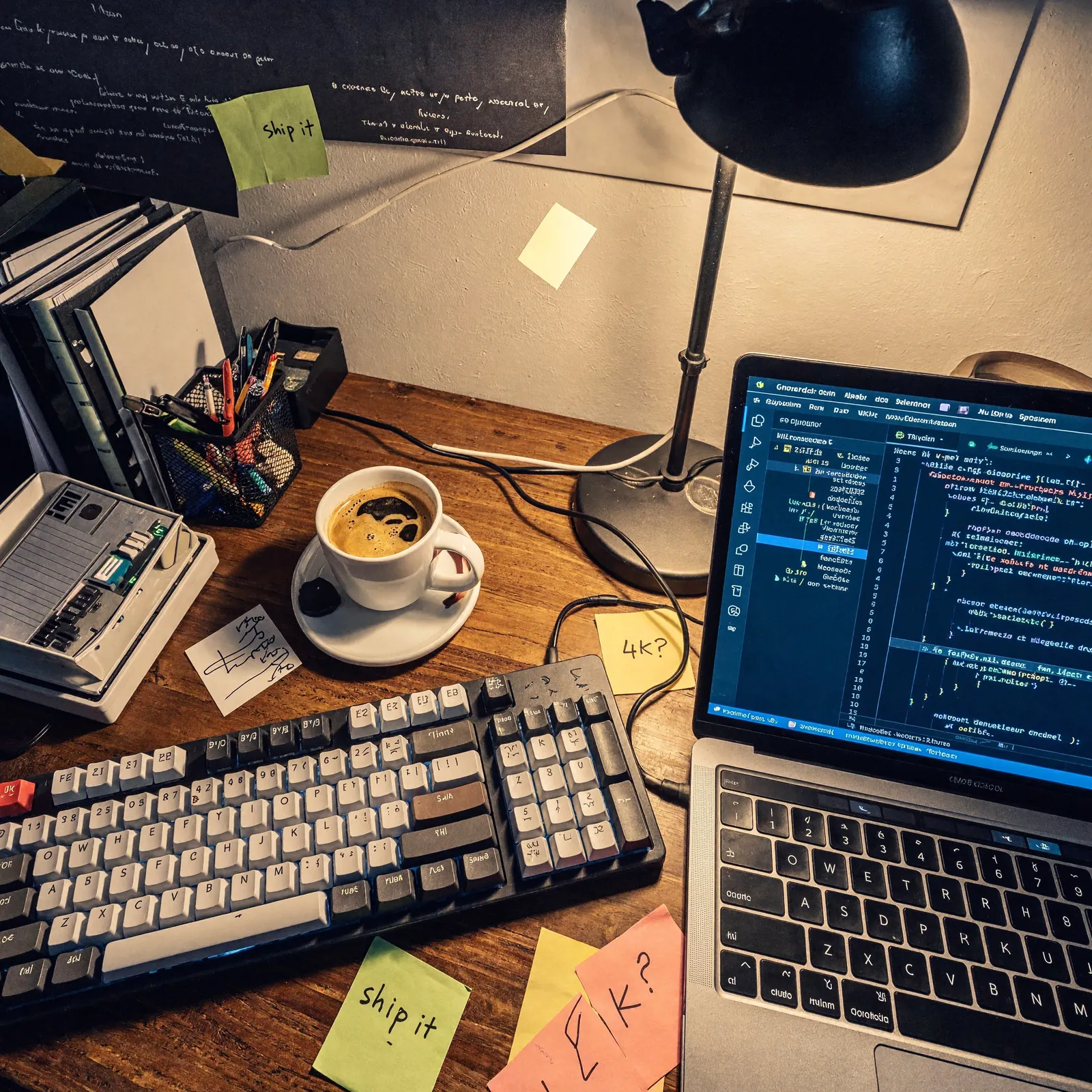
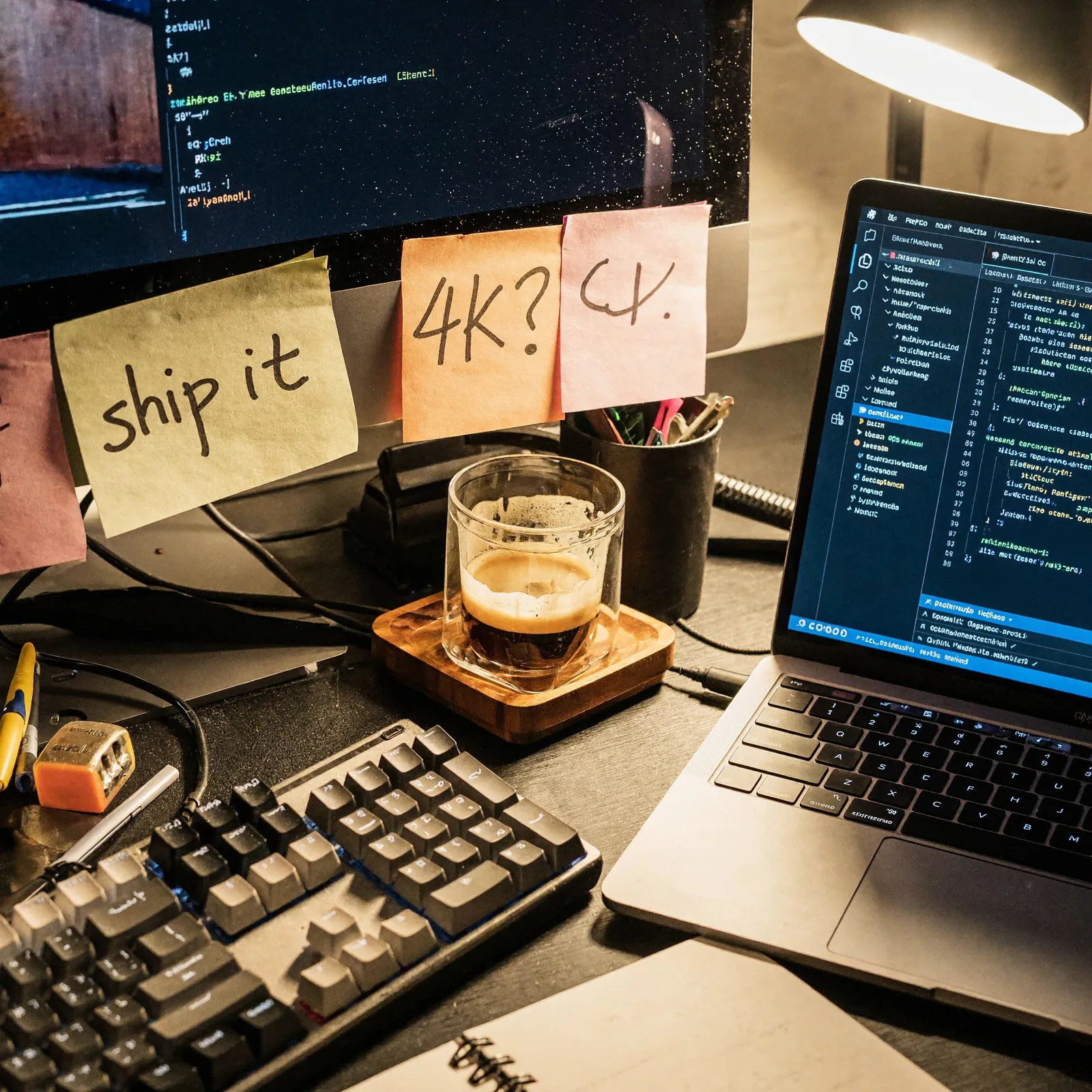
Prompt: “Overhead documentary photograph of a cluttered developer desk at night: a mechanical keyboard, a cold espresso, handwritten sticky notes reading 'ship it' and '4K?', a laptop showing a code editor, warm desk lamp light, real photography, fine paper texture and dust visible”. Prompt expansion was off for both, so the model drew from these exact words.
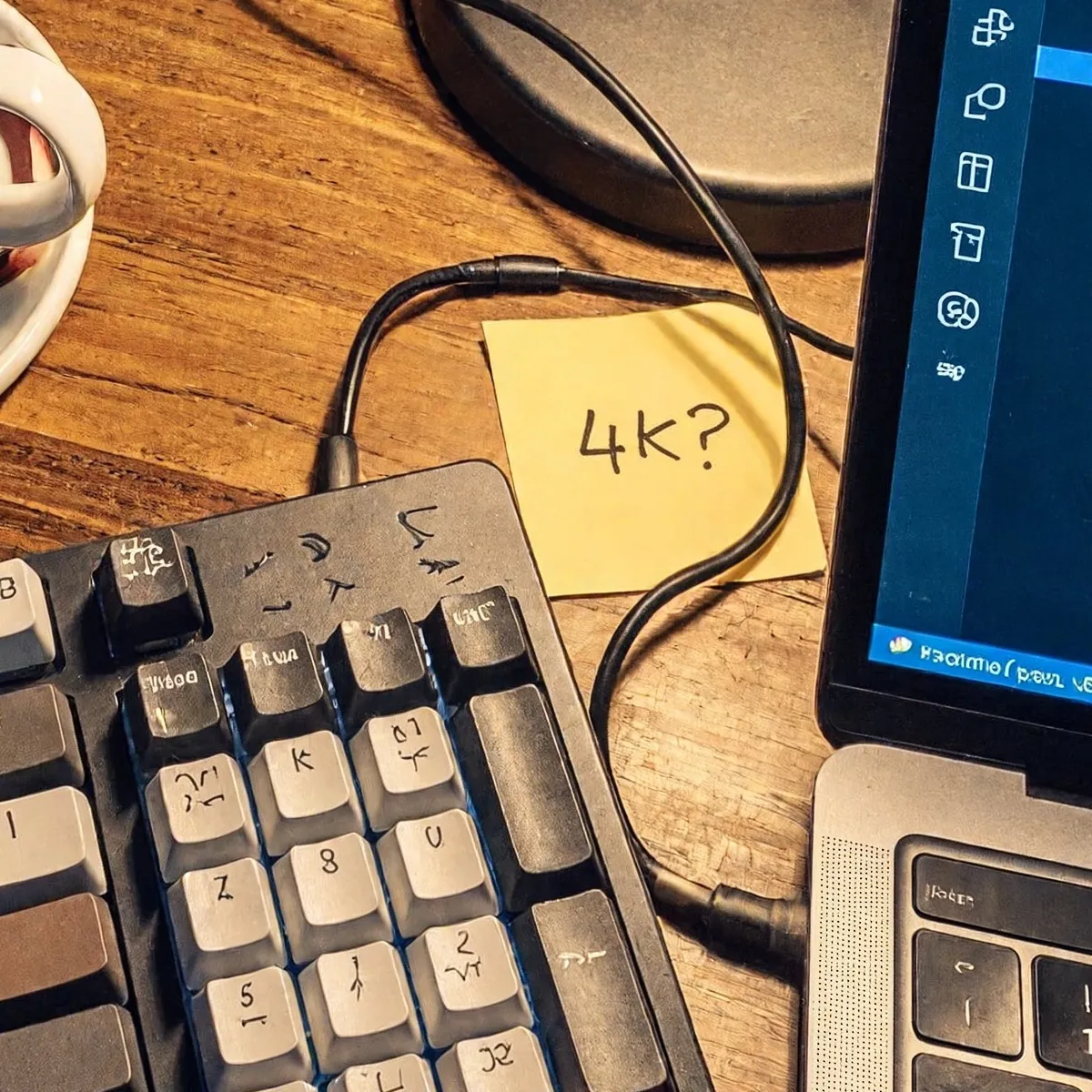
At full size the wood grain, the cable and the “4K?” note hold up with no upscaler smear. 2 faults: the keycap legends are invented glyphs, and the code on the laptop is not real text. Check small text before a picture goes to print.
How fast it is
We ran the same prompt on November 11 and read the generation time the upstream reports with each result, plus our own wait from submit to download.
| Mode and size | Generation | Submit to result |
|---|---|---|
| Standard, 1024×1024 | 8.4 s | 11.1 s |
| Standard, 2048×2048 | 9.7 s | 11.4 s |
| Highspeed, 4096×4096 | 9.1 s | 11.4 s |
| Standard, 4096×4096 | 15.0 s | 18.1 s |
| Standard edit, 4 images to 2048×2048 | 31.6 s | not timed |
Going from 2K to 4K on Standard cost 5.3 more seconds for 4 times the pixels. Edits are the slow path: the model first rewrites your instruction against every image you send.
What it costs on MegaBrain
MiniMax bills H3 Image by tokens, and MegaBrain charges for a job when it is queued, so the price is counted from your request before it runs. These are the prices from a short prompt, at our rate of $1.15 per $1 of the model’s cost:
| Size | Standard | Highspeed |
|---|---|---|
| 2048×2048 (and anything smaller) | $0.0285 | $0.0464 |
| 4096×2304 (16:9 at 4K) | $0.0509 | $0.0911 |
| 4096×4096 | $0.0822 | $0.1538 |
| 4096×4096, edit of 1 image, 200-character prompt | $0.0975 | $0.1781 |
| 2048×2048, edit of 4 images, 500-character prompt | $0.0882 | $0.1419 |
For a sense of scale, other 4K pictures on MegaBrain’s catalog, same day:
| Model, 4K | Per picture |
|---|---|
| Nano Banana Pro | $0.345 |
| Nano Banana 2 | $0.184 |
| MiniMax H3 Image, Standard | $0.0822 |
Why 1K costs the same as 2K. H3 Image makes one output token for every 32×32 pixels (16,384 for a 4096×4096 picture in our runs) and bills at least 4,096 of them. So 1024×1024 costs what 2048×2048 does. If you need small pictures, ask for 2K and downscale.
How the price adds up
MiniMax’s rates are $3.80 per million output image tokens on Standard ($7.60 on Highspeed), $2.30 per million text tokens on both, and $1.50 per million input image tokens ($3.00 on Highspeed). The text includes the prompt the model writes for itself when it expands yours. We measured 6 real runs and price each job from the request with room to spare:
- Output: width × height ÷ 1,024 tokens, at least 4,096.
- Each input image: 5,200 tokens. The most we saw was 5,122, whatever the size of the image.
- Text: 4,000 tokens, plus 2,000 for each input image, plus 2 for each character of your prompt. Our largest edit, 4 images and a 3,981-character prompt, used 9,721.
If a job fails, the whole price goes back to your balance; if the model rejects the input, nothing is charged.
The code
It uses the queue from the media API docs. The models take a size only as {"width", "height"}: the named sizes other models use are not accepted here.
"""h3_4k.py: one native 4K picture from MiniMax H3 Image, then an edit of it.

Usage: python h3_4k.py "a prompt"
"""

import os
import sys
import time

import requests

BASE = "https://getmegabrain.com/api/gateway/v1"
HEADERS = {"Authorization": f"Bearer {os.environ['MEGABRAIN_API_KEY']}"}


def run(model: str, body: dict) -> dict:
    """Submit a job to the queue, wait for it, return the model's output."""
    r = requests.post(f"{BASE}/queue/{model}", headers=HEADERS, json=body, timeout=60)
    if r.status_code != 200:
        # 400 = bad field or size, 402 = balance too low, 422 = input rejected (not charged)
        sys.exit(f"{model}: {r.status_code} {r.text}")
    job = r.json()
    while True:
        status = requests.get(job["status_url"], headers=HEADERS, timeout=30).json()["status"]
        if status == "COMPLETED":
            break
        if status == "FAILED":
            sys.exit(f"{model} failed; the price goes back to your balance")
        time.sleep(3)
    return requests.get(job["response_url"], headers=HEADERS, timeout=60).json()


def save(url: str, path: str) -> None:
    with open(path, "wb") as f:
        f.write(requests.get(url, timeout=120).content)
    print("saved", path)


def main() -> None:
    prompt = sys.argv[1]

    # Native 4K: ask for the pixels. 4096x4096 is 16,384 output tokens.
    picture = run(
        "minimax/h3-image",
        {
            "prompt": prompt,
            "image_size": {"width": 4096, "height": 4096},
            "output_format": "jpeg",  # a 4K PNG is several times larger
        },
    )
    url = picture["images"][0]["url"]
    save(url, "h3_4k.jpg")

    # An edit on the fast mode: "auto" keeps the first image's shape at about 2K.
    edited = run(
        "minimax/h3-image/highspeed/edit",
        {
            "prompt": "Turn the lamp light cold blue. Keep every object in place.",
            "image_urls": [url],
            "image_size": "auto",
            "output_format": "jpeg",
        },
    )
    save(edited["images"][0]["url"], "h3_edit.jpg")


if __name__ == "__main__":
    main()
Run it:
pip install requests
export MEGABRAIN_API_KEY="your key"
python h3_4k.py "Overhead photo of a developer desk at night, warm lamp light, sticky notes"
The same job from a shell, a 9:16 picture at 4K on Highspeed:
curl -X POST https://getmegabrain.com/api/gateway/v1/queue/minimax/h3-image/highspeed \
  -H "Authorization: Bearer $MEGABRAIN_API_KEY" \
  -H "Content-Type: application/json" \
  -d '{"prompt": "a glass bottle of cold brew on wet slate, morning light", "image_size": {"width": 2304, "height": 4096}}'
Build it with Cursor, Claude Code or Codex
Paste this into your agent; it has every field and limit it needs:
Add 4K hero images to this project with the MegaBrain API and MiniMax H3 Image.

API: base URL https://getmegabrain.com/api/gateway/v1, header
"Authorization: Bearer $MEGABRAIN_API_KEY". POST /queue/<model id> returns
status_url and response_url; poll status_url every 3 seconds until COMPLETED
or FAILED, then GET response_url. The image is at images[0].url.
Docs: https://getmegabrain.com/docs/media

Models: "minimax/h3-image" (Standard) and "minimax/h3-image/highspeed" (faster,
dearer). Body: prompt (up to 20,000 characters), image_size as
{"width", "height"} only (655,360 to 20,000,000 pixels, 1:3 to 3:1; no named
sizes), num_images 1 to 4, output_format "jpeg". For edits use ".../edit" with
image_urls (1 to 16 https:// or data: URLs) and image_size "auto".

Write a script that reads a list of page names and prompts from heroes.json,
makes one 4096x2304 image per page on Standard, saves it under public/heroes/,
and prints the cost of each job from the catalog at /media/models.
Can you run it yourself?
If you are allowed to, and have the hardware. MiniMax’s repository puts the download for SGLang or vLLM-Omni at about 135 GB: 66.28 GB of transformer, a 2.34 GB VAE and the 66.7 GB text encoder it shares with MiniMax H3. A B200 holds the whole model in about 135 GiB; on a single smaller GPU, SGLang offloads parts of it, and its cookbook has recipes down to 12 GB cards. ComfyUI has text-to-image and edit templates.
The license is the limit. The MiniMax-H3-Image Community License excludes the European Union, the United Kingdom, South Korea and the United States, and needs MiniMax’s written approval above $1 million in yearly revenue or to host the model for others. Through an API you skip both the download and that question.
MiniMax H3 Image in 6 numbers
- 16,384 output tokens in a 4096×4096 picture, one per 32×32 pixels.
- 9.1 seconds for 4K on Highspeed in our test, faster than 2K on Standard (9.7).
- 4.2x: how much more a 4K Nano Banana Pro picture costs on MegaBrain than a 4K H3 Image on Standard, $0.345 against $0.0822.
- 32,000 characters: the longest prompt MiniMax takes (20,000 through MegaBrain).
- 6 sampling steps per picture in the open model.
- November 17: the last day of MiniMax’s own 50% discount on 4K requests (until 16:00 UTC), and fal gives 3 to 5 free pictures a day in its web playground until November 23.
What it means if you build with AI images
Print-size pictures are now an API call. A 4096×4096 square leaves room to cut a 9:16 story, a 4:5 feed post and a 16:9 hero from one render without an upscaler.
Pay for pixels, not for “4K” labels. The price follows the area you ask for. A 16:9 picture at 4096×2304 costs 38% less than the 4096×4096 square, by our arithmetic, so ask for the shape you will publish.
Draft on Highspeed, keep on Standard. Highspeed is the fast loop; when a frame works, the Standard render of the same prompt costs about half as much.
Mind small text. Our pictures invented keycap letters and screen code. For packaging and labels, test before you ship.
Try it on MegaBrain
All 4 models run in the playground on their pages before you write code: MiniMax H3 Image, Highspeed, and their edit versions, from one pay-as-you-go balance with the rest of the image and video models. For a full pipeline from one API key, see product photo to video with 2 API calls.
Full disclosure: MegaBrain sells pay-as-you-go API access to image, video and text models, including MiniMax H3 Image. MegaBrain is not affiliated with MiniMax.
Sources
Pages opened November 11, 2026. Timings and token counts are from our own runs that day; MegaBrain prices are from its model pages.
- MiniMax — H3 Image announcement (November 11, 2026)
- MiniMax — API pricing: token rates, example prices, the 4K launch discount
- MiniMax — image generation guide: limits, sizes, prompt length
- Hugging Face — MiniMax-H3-Image weights, model card and license
- GitHub — MiniMax-H3-Image: download sizes, SGLang and vLLM-Omni serving
- MegaBrain — MiniMax H3 Image (Standard), price and playground
- MegaBrain — MiniMax H3 Image Highspeed
- MegaBrain — media API docs (queue, statuses, refunds, parameters)
MegaBrain for Mac · an AI coworker
Give MegaBrain the task, not the steps.
It works on your files, writes documents, spreadsheets and decks, connects to your team’s tools and asks before anything risky. Free to start.
Newsletter
Stay in the loop
Get our latest AI research and guides. No spam, unsubscribe anytime.