An AI coworker for finance teams
MegaBrain works on the spreadsheets in a folder you choose. It reads the ledger, the payout export and last month’s workbook, and writes Excel files with real formulas, so every total can be checked. Here are tasks finance teams hand it, each with a prompt you can copy into the app.
In the app, Library → Plugins → Finance adds skills for budgets with live formulas, variance memos and expense summaries. The prompts below work with or without it.
Reconcile a ledger against payouts
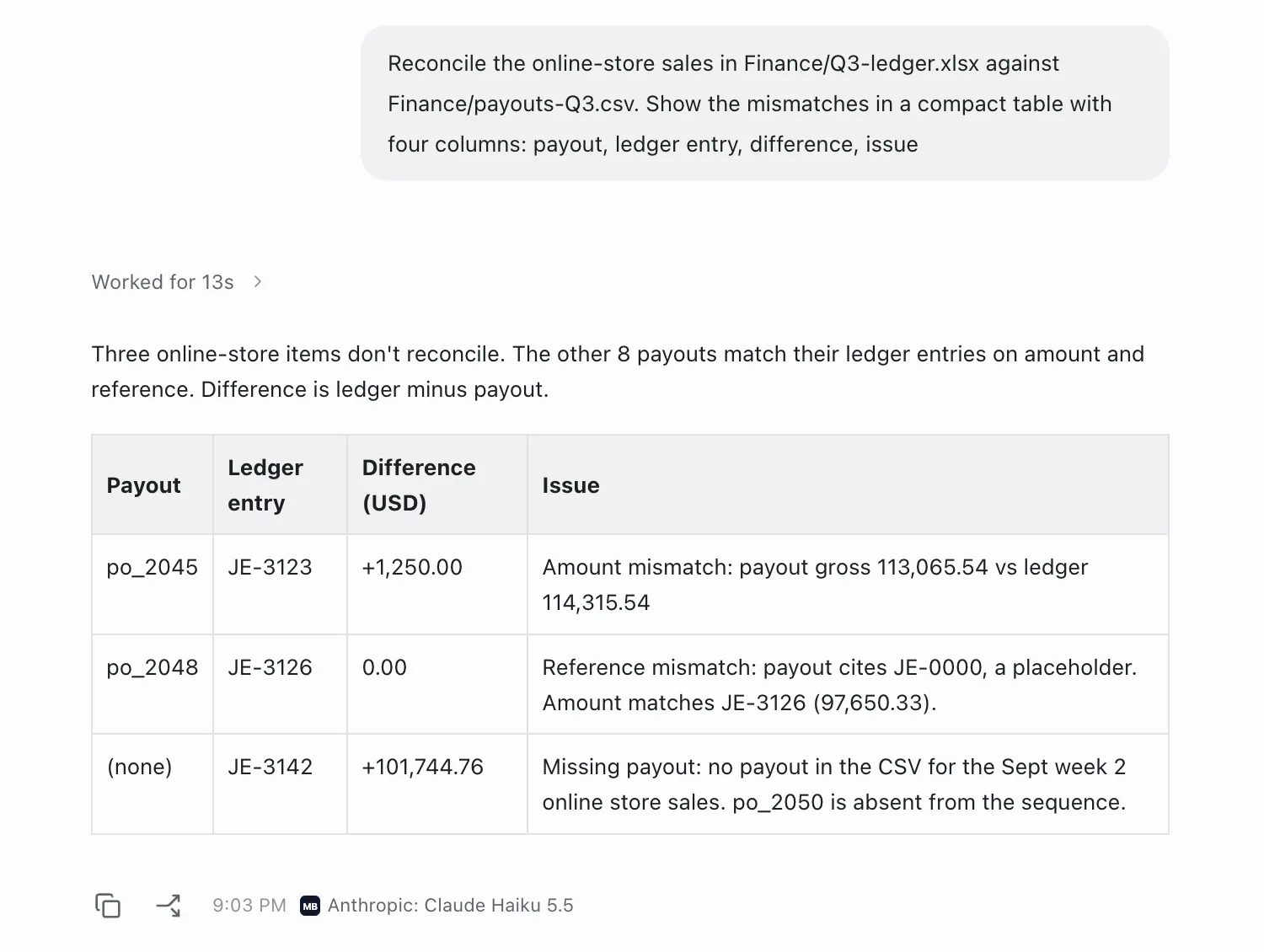
Point it at the ledger and the payout export. It matches them row by row and shows only what does not add up, with the reason for each difference.
Prompt
Reconcile the online-store sales in Finance/Q3-ledger.xlsx against Finance/payouts-Q3.csv. Show the mismatches in a compact table with four columns: payout, ledger entry, difference, issue.
Works with
Only reads: it changes no files.
Build a budget with live formulas
From a list of income and costs it builds a 12-month workbook: a formula in every month, totals, and a summary by category that stays live when you change a number.
Prompt
Build a 12-month budget from Finance/budget-inputs.csv: one row per line item and one column per month, with formulas rather than typed numbers, a total row, a yearly total and a Summary sheet by category. Save it as Finance/budget-next-year.xlsx.
Works with
Explain the month’s variances
It lines up actuals against budget, computes each variance with a formula and explains the largest gaps in a one-page memo. What it cannot explain from the data, it marks as a question.
Prompt
Compare Finance/actuals-october.xlsx with Finance/budget.xlsx line by line. Put budget, actual, variance and variance % in Finance/variance-october.xlsx with formulas, then explain the five largest variances in a one-page memo, Finance/variance-memo-october.docx. Mark anything you cannot explain from the data as a question.
Works with
Sort receipts and card spend
It reads receipts and a card export, puts every expense in a category with totals, and flags duplicates and missing receipts instead of guessing amounts.
Prompt
Read the receipts in Finance/Receipts/November and the card export Finance/card-november.csv. List every expense with date, vendor, amount and category in Finance/expenses-november.xlsx, add totals by category as formulas, and flag duplicates and card lines with no receipt.
Works with
Turn the quarter into a board deck
From the quarter’s numbers it writes a short deck and a one-page summary, and asks before it deletes the working files it made on the way.
Prompt
Turn the Q3 numbers in the Finance folder into a 6-slide board deck and a one-page summary. Save them as Finance/Q3-board-deck.pptx and Finance/Q3-summary.docx.
Works with
Asks first: before it deletes a file
Connectors and files it uses
You connect each tool once in Library → Connectors and sign in to it in your browser; MegaBrain never sees your password. It reaches only the folders and tools you give it.
- Files in the folder you choose
- Excel, CSV, Word and PDF files: ledgers, exports, receipts and last month’s pack.
- Stripe
- Customers, payments, invoices and subscriptions.
- PayPal
- Invoices, orders and transactions in a PayPal business account.
- Gmail or Outlook
- Invoices and statements that arrive by email.
- Google Drive or OneDrive
- The shared workbooks your team keeps there.
How to connect Gmail, Google Drive, Outlook and Slack: Help → Apps.
Put it on a schedule
Scheduled tasks repeat on their own, on your Mac while it is awake and MegaBrain is open. Templates to copy, with the prompt, what each one needs and when it runs:
Questions
Does MegaBrain write real Excel formulas?
Yes. It writes .xlsx files with formulas such as SUM and SUMIF rather than pasted values, so totals update when a number changes and you can see how each one was computed.
Does it connect to my accounting software?
Not directly today. Export the ledger or the report as Excel or CSV into the folder MegaBrain works in. Stripe and PayPal connect in one click under Library → Connectors, and a tool with an MCP server can be added by hand.
Can it change my files without asking?
It works only in the folders you choose. Deleting, sending and posting can wait for your approval, and you can set a task to ask before every action.
Try it on your own files
Download MegaBrain, point it at a folder and paste a prompt. Free to start, paying for models from your credits; Pro, Plus and Max include frontier models and MegaBrain Core.
For Macs with Apple silicon. Windows is coming: leave your email on the download page to hear when it is ready.