An AI coworker for legal teams
MegaBrain reads a whole folder of contracts at once and puts the terms that need you side by side: risky clauses, departures from your playbook, notice dates. It gives you a first pass, not legal advice: a person with legal training makes the calls.
Review a folder of contracts
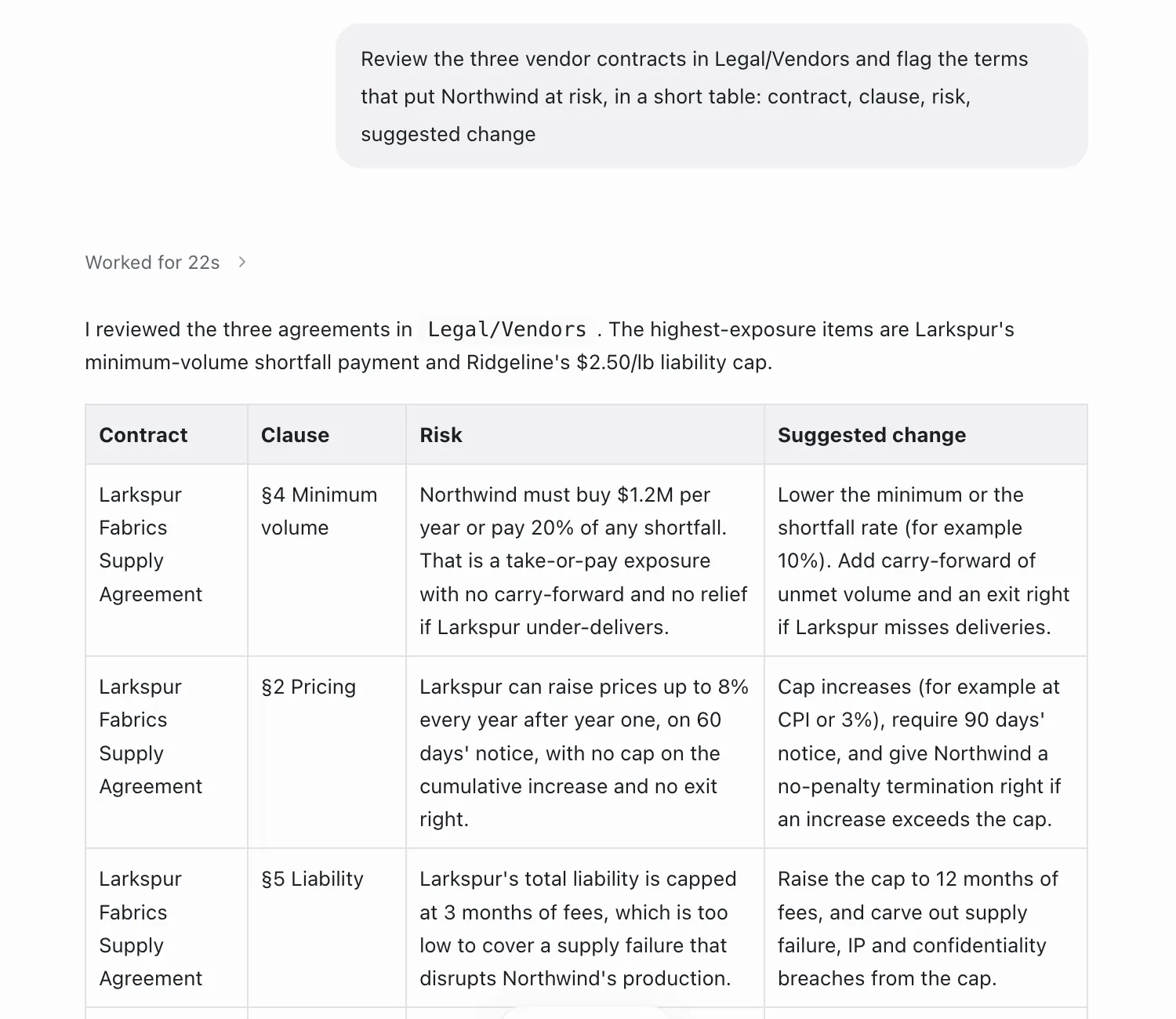
It reads every contract in the folder and puts the risky terms in one table with a suggested change, so you start from the clauses that need you.
Prompt
Review the three vendor contracts in Legal/Vendors and flag the terms that put Northwind at risk, in a short table: contract, clause, risk, suggested change.
Works with
Only reads: it changes no files.
Check a contract against your playbook
Give it your playbook and the other side’s draft. It lists each clause that departs from your positions, with what the playbook allows and a suggested redline.
Prompt
Compare Legal/Inbound/harbor-msa.docx with our playbook in Legal/playbook.md. List every clause that departs from the playbook in a table — clause, what it says, what the playbook allows, suggested redline — and save it as Legal/Reviews/harbor-msa-review.docx.
Works with
Keep a register of notice dates
It reads every contract and records the parties, term, renewal and the last day to give notice in one spreadsheet, sorted by that date.
Prompt
Read every contract in Legal/Contracts and build Legal/contract-register.xlsx with one row per contract: parties, start date, end date, renewal terms, notice period and the last day to give notice, sorted by that date. Quote the clause each date comes from.
Works with
Explain a contract to the business
It writes a one-page, plain-English summary of what each side commits to, so sales or finance can act without reading the whole agreement.
Prompt
Summarize Legal/Inbound/harbor-msa.docx in one page of plain English for the sales team: what we commit to, what they commit to, payment terms, liability, termination and anything unusual. Give the clause number for each point.
Works with
Connectors and files it uses
You connect each tool once in Library → Connectors and sign in to it in your browser; MegaBrain never sees your password. It reaches only the folders and tools you give it.
- Files in the folder you choose
- Contracts in Word or PDF, your playbook and templates.
- Google Drive or OneDrive
- Contracts your team keeps there.
- Gmail or Outlook
- Drafts that arrive by email.
- Confluence or Notion
- Your playbook, if it lives there.
How to connect Gmail, Google Drive, Outlook and Slack: Help → Apps.
Put it on a schedule
Scheduled tasks repeat on their own, on your Mac while it is awake and MegaBrain is open. Templates to copy, with the prompt, what each one needs and when it runs:
Questions
Is MegaBrain a substitute for a lawyer?
No. It reads documents and points to the terms worth a look, quoting the clause it found them in. A person with legal training decides what to accept, change or sign.
Where do my contracts go?
Your files stay in the folders you chose on your Mac. To do a task, MegaBrain sends the text it needs to the model working on it, as any AI assistant does. On Teams, the owner chooses which models people may use.
Try it on your own files
Download MegaBrain, point it at a folder and paste a prompt. Free to start, paying for models from your credits; Pro, Plus and Max include frontier models and MegaBrain Core.
For Macs with Apple silicon. Windows is coming: leave your email on the download page to hear when it is ready.